
Shopify cross-sells for related products and add-ons
A cross-sell offers a related product or accessory alongside the main purchase. FairRev lets merchants choose the products and the context themselves. It does not establish purchase-history recommendations or automatic personalized selection.

A cross-sell offers a related product or accessory alongside the main purchase. FairRev lets merchants choose the products and the context themselves. It does not establish purchase-history recommendations or automatic personalized selection.
Show relevant accessories and related products
Start with a real relationship: an accessory that fits the main item, a consumable it uses or a companion that completes a task. Relevance depends on fit, variant, stock and customer need. A discount cannot make an incompatible accessory useful.
FairRev distinguishes ordinary product add-ons from sellable service add-ons. The documented ski wax example is a catalogue product. It does not demonstrate a gift-wrap message field, warranty service or shipping-protection workflow.
See a shopper-facing cross-sell example
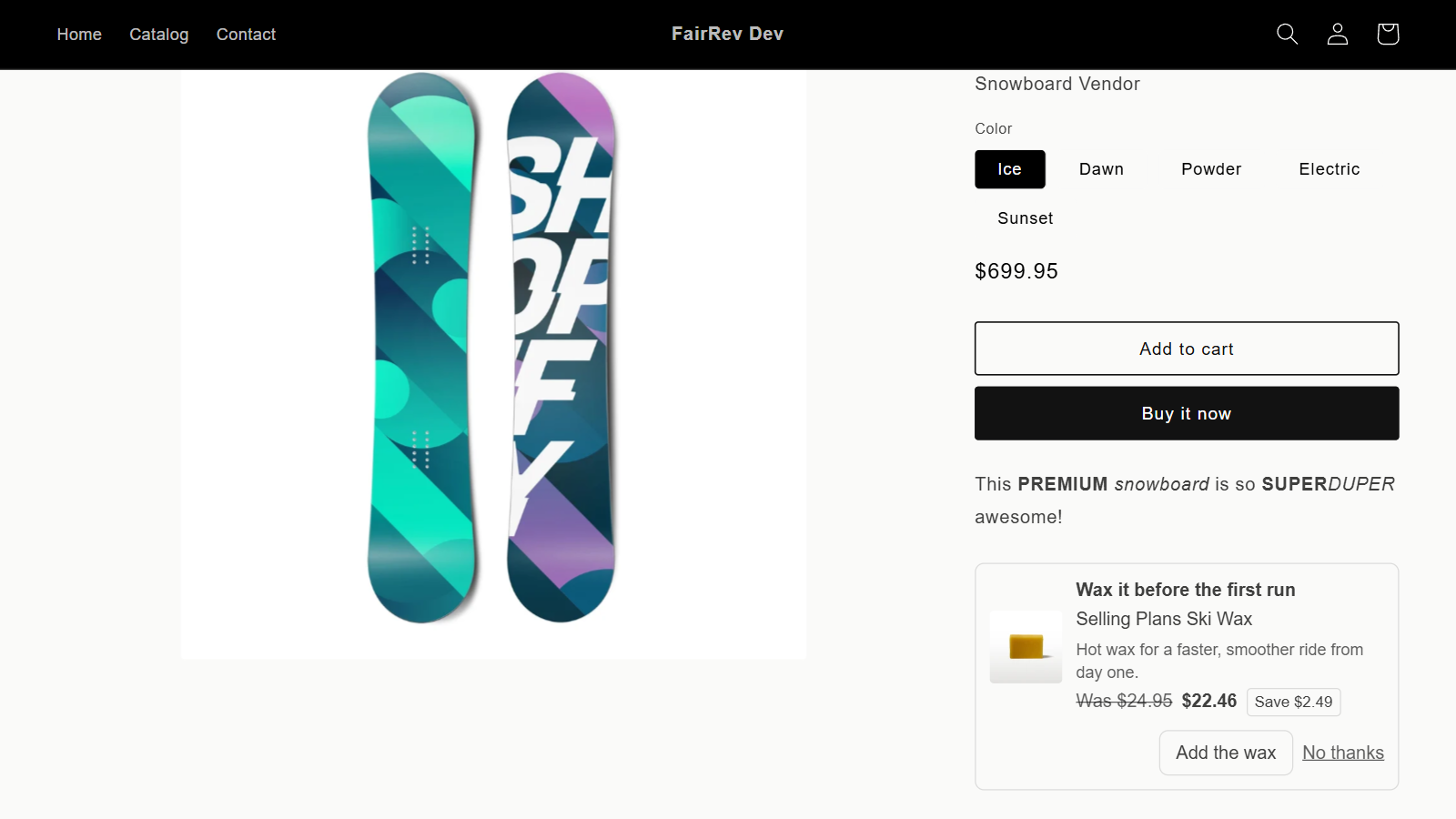
This recorded development-store example offers ski wax beneath a snowboard. The screenshot shows the wax at 22.46 USD after a 2.49 USD discount from its 24.95 USD catalogue price. These are test catalogue values, not a merchant revenue or conversion claim. The offer was configured as Add on, which demonstrates an accessory flow. A dedicated Cross sell type walkthrough remains pending.
Set up product add-ons and related offers
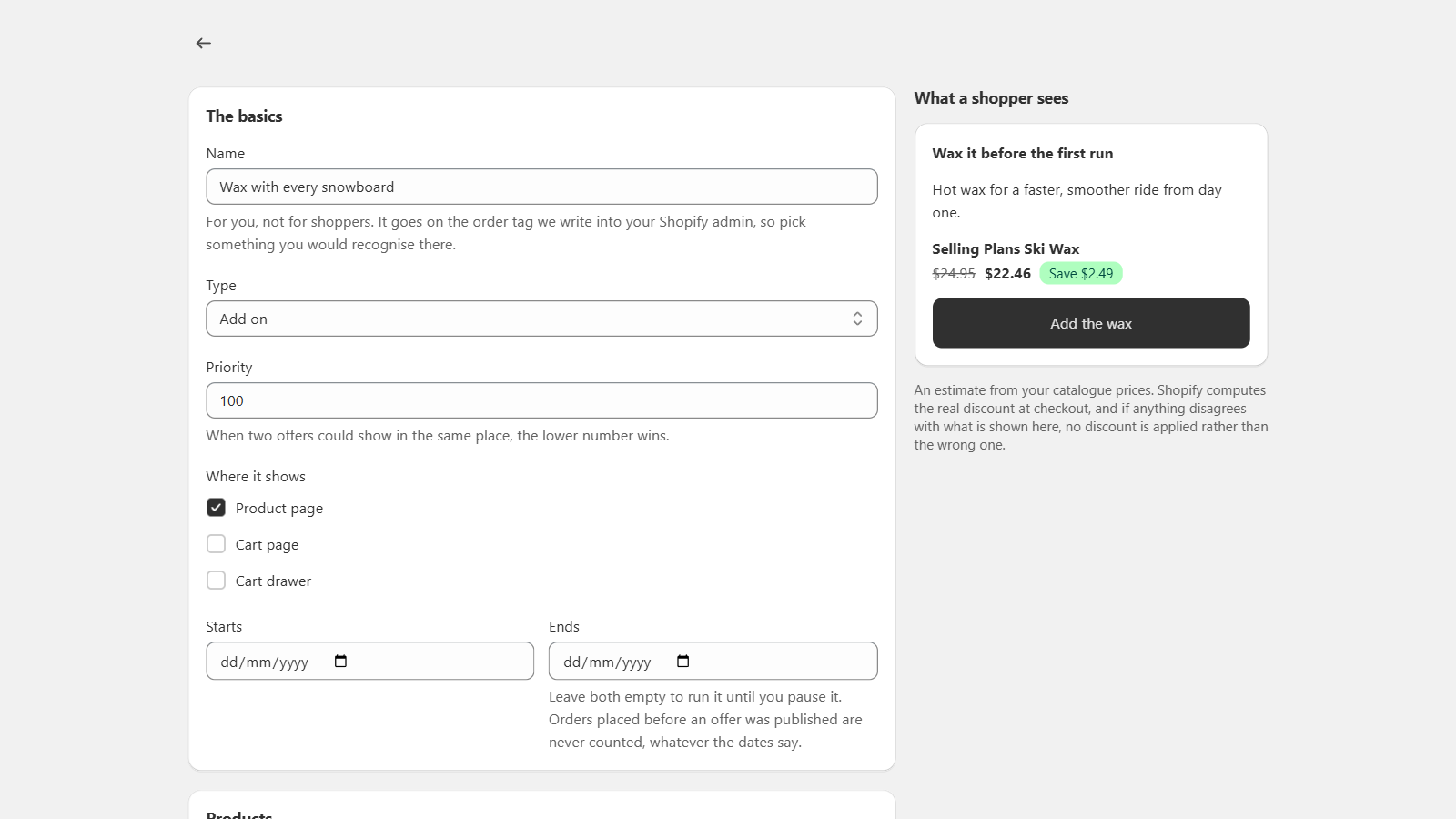
The recorded workflow chooses Add on, Product page, a trigger product, an offered variant and a discount, then writes the shopper copy. Save creates a draft; Publish is separate. Confirm that the offer is shown as live rather than only waiting to publish.
Select related variants manually. Explain why the item is useful, show a readable label and make acceptance optional. A resource picker and preview are aids to setup, not proof of final checkout behavior for every variant or market.
Use supported product page and cart placements
Product and cart pages use theme app blocks in suitable sections. Cart drawers require an adapter and an actual interaction test. The recorded evidence supports the development-store product page, not all cart or drawer journeys. Review Shopify cart upsell app checks before enabling those contexts.
Test an offered product that is absent from the basket, one already present, and a trigger that is removed. Compare the item added with the named variant and quantity. Confirm the final checkout price and test on a narrow screen.
Check recommendation behavior and limitations
Products are merchant-selected. No evidence establishes automated selection from historical purchases. Grouping multiple selected items in code is not by itself the expected frequently bought together experience. Theme prediction is also not universal compatibility.
The demonstrated flow on this page is Add on on a development-store product page. A dedicated Cross sell configuration and cart/drawer journeys have not yet been demonstrated. Ask for the specific workflow your store needs rather than assuming every type or placement behaves identically.
Review pricing and attribution
Every available feature is included in each plan. FairRev pricing describes the free allowance and paid floor and ceiling. An extra catalogue item is not a separate feature fee.
FairRev attribution matches accepted variants to eligible order lines, counts discounted amounts and excludes defined order types. The screenshot's discounted wax price is not proof of incremental lift. Use controlled testing to estimate what would have happened without the offer.
Read the upsell and cross-sell setup guide for the recorded steps and a testing checklist. Contact [email protected] about availability and a walkthrough for your theme.